Relay for reddit
- 4.0
- Rating
- 100.00K
- Installs
- Free
- Price

 Analysis by App-foxy
I spent time with Relay for reddit as a news and magazine reader, and my first impression was that it feels designed for people who want to browse Reddit without treating every screen like a plain list of links. Developed by DBrady, this free Android app gives conversations, images, videos, and comments a more deliberate visual structure. The result is pleasant when I am settled in for a few minutes of reading, but it also asks me to learn its gestures and layout before it becomes genuinely comfortable.
That learning curve matters especially when looking at the app through an accessibility lens. Relay presents information clearly in many situations, yet its reliance on compact controls, motion, and touch gestures can affect people with different visual, motor, sensory, or attention needs. I would recommend trying it if you enjoy Reddit and want a polished alternative to a standard browser or a more basic client. I would be more cautious if you need very large controls, minimal animation, or a completely predictable tap-only interface.
Readability and navigation in everyday browsing
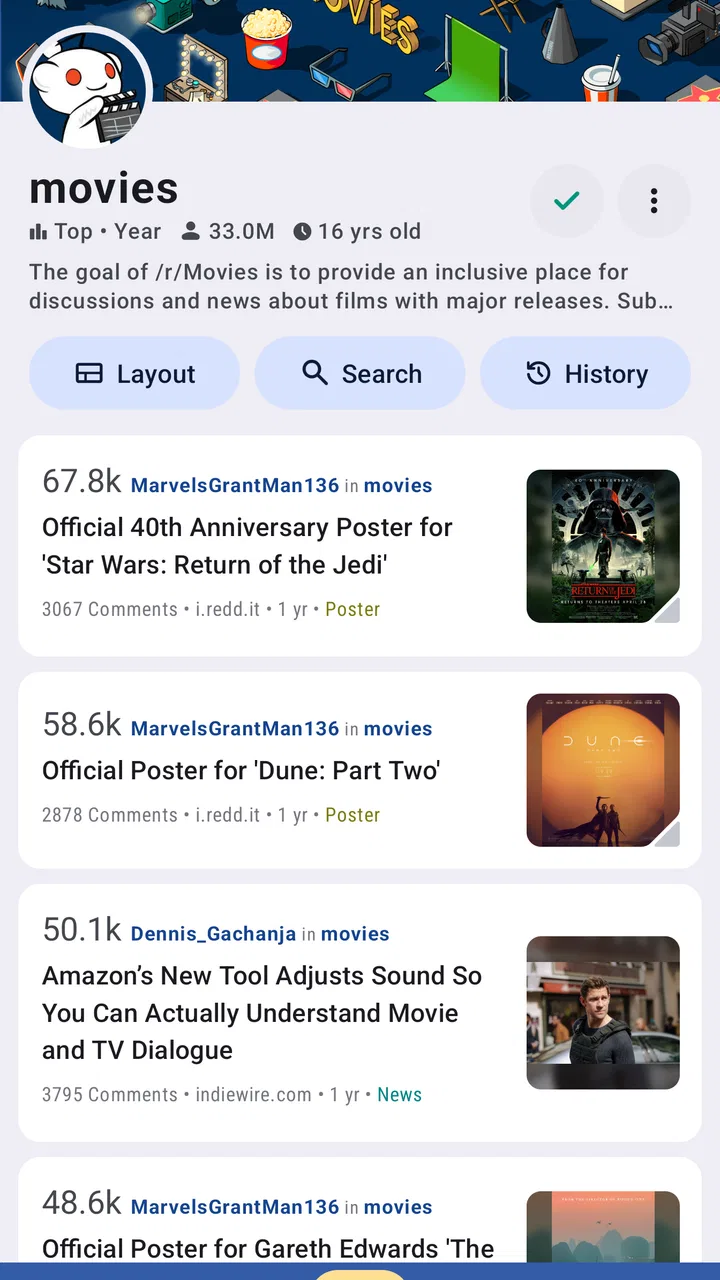
The strongest part of Relay is the way it turns a busy Reddit feed into something I can scan without feeling buried immediately. Posts are separated visually, and the Material-inspired design gives the interface a sense of hierarchy. Titles, community context, vote controls, comment counts, and media are easier to distinguish than they often are on a mobile website. That organization helps when I am quickly checking several communities rather than opening one post at a time.
You May Also Like

 Blood Strike: 2.5 Anniversary
Blood Strike’s Loadouts Turn Every Drop Into a Tactical Gamble
A close look at Blood Strike’s custom loadouts: how fast access to signature weapons reshapes its battle royale rhythm, rewards preparation, and narrows the gap between fights.

 Pandora - Music & Podcasts
Pandora’s Music Is Easy to Start, but Harder to Recover
Pandora’s strength is its low-effort path from a seed to a station. Its weak spot is how much confidence it asks you to place in connection, setup, and quiet recovery.

 8 Ball Pool
 Is Built on Rivalries, Rematches, and Routine
A close look at the rivalries, rematches, shared routines, and unanswered safety questions that turn a quick pool match into a persistent mobile community.

 Samsung Music
’s Quiet Strength Is Playing What You Already Own
Its reach comes less from spectacle than from dependable access to a personal library. That simplicity is both the app’s strongest retention engine and its ceiling.

 AccuWeather: Weather Radar
AccuWeather Review: A Quick, Clear Forecast for Everyday Decisions
For everyday plans, the best forecast is the one you can understand quickly. AccuWeather makes rain timing, radar, and local conditions easy to act on, with a few trade-offs.

 Hill Climb Racing
Why Hill Climb Racing Still Turns Crashes Into One More Run
A tiny car, a bumpy hill and one more upgrade: Hill Climb Racing keeps resurfacing because its simple chaos makes every near-miss feel personal.
More From Our News Desk



The app’s animations also contribute to the feeling of movement between screens. Opening a post, moving through a discussion, and returning to the feed feels more connected than a series of abrupt page changes. I found that attractive during relaxed reading, particularly when browsing visual posts. At the same time, animation is not automatically helpful for everyone. A person who becomes distracted by motion, feels discomfort from transitions, or simply wants the fastest possible route to text may prefer a calmer interface.
Relay’s swipe gestures are central to the experience. Once I understood what a swipe was expected to do, they made common actions feel quick. I could move through content with less visual hunting than I might need with a row of small buttons. This is one of the app’s less obvious trade-offs: gestures reduce clutter, but they also hide actions from anyone who does not know they exist. A new user may need a short practice period before navigation feels obvious.
For reading long comment threads, the visual presentation is more useful than the novelty of the transitions. Reddit discussions can become difficult to follow because replies branch in several directions, and Relay’s spacing and nesting make the conversation easier to inspect on a phone. I still had to slow down in very deep threads, but the app did not make me feel as though every reply was competing for the same attention.
The interface works best when I use it as a focused reader rather than trying to perform many tasks at once. If I am moving between communities, opening media, reading comments, and composing replies rapidly, I have to keep track of where I am in the navigation flow. People who rely on strong location cues may appreciate the consistent card-like presentation, but they should still expect to spend time learning the app’s rhythm.
What the visual design helps with
Relay is a good fit for readers who benefit from clear grouping. The separation between a post and its discussion gives my eyes a natural order: identify the subject, inspect the media or link, then decide whether the comments are worth opening. That sequence is helpful when I am tired or when the feed contains many unrelated topics.
I also like that the app does not make every interaction look equally important. Voting, commenting, sharing, and moving through content occupy different parts of the experience. This reduces the feeling of a crowded control panel. The design is not a replacement for system-level accessibility tools, but its visual organization can make ordinary browsing less mentally demanding.
There is a practical reading tip here: I get more from Relay when I open a post before deciding that its title is uninteresting. The feed is useful for scanning, but the app’s presentation of comments and media is where it earns its place. For someone who reads Reddit mainly through headlines and rarely enters discussions, a regular browser may be simpler and more direct.
Learning the gestures without frustration
I would not judge the first few minutes too quickly. The app’s gesture-driven behavior can feel less obvious than visible buttons, especially if I arrive from a browser where links and controls follow familiar patterns. I recommend exploring slowly, repeating each gesture, and avoiding rapid swiping until the result becomes predictable. That is particularly important for users with limited dexterity or reduced confidence with touch interfaces.
A useful workflow is to use short, deliberate swipes rather than broad movements. Small changes in finger placement can make a gesture easier to repeat, and a slower pace lowers the chance of opening the wrong item or moving farther than intended. This is not a formal accessibility setting; it is simply the way I found the interface easier to control.
Relay is also more comfortable when I treat navigation as a sequence rather than a collection of hidden shortcuts. I open one post, read enough of the discussion to decide whether to continue, and then return to the feed. That approach avoids the disorientation that can come from rapidly stacking screens, and it works well for readers who need more time to process each page.
Motor, sensory, and attention considerations
From a motor perspective, Relay has both a strength and a weakness. Swiping can be easier than accurately targeting several small icons, particularly for someone who finds precise taps tiring. However, a gesture still requires controlled movement, and it may be difficult for people who use a stylus, one hand, an alternative touch technique, or a device mounted at an awkward angle.
The app’s compact mobile layout means that some actions are likely to be more comfortable on a larger phone than on a cramped screen. I found that media and comment reading benefited from having enough display space to keep the surrounding context visible. On a smaller device, the same density that helps experienced readers scan quickly can make controls feel crowded.
People with tremor or limited range of motion should pay attention to how forgiving the gestures feel on their particular device. A browser with clearly labeled buttons may be a better choice if accidental swipes are a frequent problem. Relay’s speed is valuable only when I can trigger the intended action consistently.
For sensory needs, the animated transitions are the most noticeable consideration. They give the app personality and make movement through Reddit feel less mechanical, but I would not describe them as universally comfortable. If motion causes discomfort or pulls attention away from text, Relay may require more adaptation than a simpler reader. I would test it during a normal reading session rather than deciding based on a single screen.
Sound-sensitive users may appreciate that the core experience is primarily visual, but Reddit content itself can include media with its own audio or rapid visual changes. That is not unique to Relay, yet the app makes it easy to move from a text feed into mixed media. I recommend opening video posts cautiously and checking the device’s volume before browsing in quiet places.
Attention is another area where Relay can be either helpful or demanding. Its clean presentation lets me focus on one post, while the endless variety of Reddit encourages frequent switching. I use a simple rule: if I open several posts without finishing any, I return to the feed and choose one discussion deliberately. That small habit makes the app feel less distracting and turns it into a reading tool rather than an automatic scrolling loop.
A realistic commute and home scenario
Imagine checking Reddit during a short train ride. Relay’s structured feed is useful because I can scan quickly, open a promising discussion, and read a few comments before reaching my stop. The swipe navigation can be faster than tapping through a browser, and the visual separation helps me remember which post I was reading.
The same journey exposes a weakness. Movement, glare, one-handed use, and interruptions make precise interaction harder. A swipe may be misread when the phone shifts, and animated transitions may feel less comfortable while I am already dealing with motion around me. In that situation, I would use Relay for brief reading rather than composing a long reply. At home, with both hands available and fewer distractions, its richer layout becomes much easier to enjoy.
This distinction is important for people who need reliable access in changing environments. An app can be comfortable at a desk and awkward outdoors without either experience being unusual. Relay is strongest when I can give it attention, see the screen clearly, and perform gestures deliberately.
Who will benefit most from Relay
I think Relay suits Reddit readers who care about comment browsing, visual organization, and a more app-like experience than a mobile website provides. It is especially appealing if I spend time moving between text discussions and media posts, because the presentation feels made for that mixture rather than adapted from a desktop page.
It also makes sense for someone who enjoys learning interface shortcuts. Once the gestures become familiar, they reduce the need to search for visible controls. Readers who regularly browse in short sessions may appreciate how quickly they can move through a feed after the initial adjustment.
On the other hand, I would skip it if my priority is absolute simplicity. A browser can be preferable when I need conventional links, familiar navigation, or fewer app-specific behaviors. A basic Reddit client may also be a better fit if I want large, obvious controls and little visual motion. Relay is not the automatic best option simply because it looks more polished.
Situational access, version, and practical expectations
Relay for reddit is free to install, with optional in-app purchases ranging from under a dollar to about ten dollars per item. That gives curious users a low-risk way to test the interface before deciding whether its extra conveniences are worth paying for. I would spend time with ordinary browsing first, because the real question is not whether the app looks attractive but whether its gestures and density work for my hands and eyes.
The app carries a Mature 17+ content rating. That matters for families and for anyone choosing software for a younger user, since Reddit itself can contain adult, disturbing, or otherwise unsuitable discussions. Relay’s clean presentation does not change the nature of the material it displays. I would not treat the tidy interface as a guarantee of a controlled reading environment.
It supports Android devices running version 7.0 or later, and the current version is 13.1.09. In practical terms, that makes it relevant to a broad range of Android phones, though the experience can still vary with screen size, touch response, display brightness, and system accessibility settings. I would check how the app behaves with my device’s font and display adjustments before committing to it as my main reader.
Relay has been available since August 3, 2011, and its long presence helps explain why the app feels like a mature alternative rather than a quick experiment. It has an average rating of 4.0 from around thirty-seven thousand ratings, with roughly seven thousand reviews, and more than one hundred thousand installs. Those figures suggest an established audience, but they should not replace a personal test: accessibility is highly dependent on the individual user and device.
One useful comparison is with the usual mobile browser. The browser wins for familiarity and direct access, especially when I need to follow ordinary links or use a service exactly as a website presents it. Relay wins when I want a dedicated reading flow, clearer separation of discussions, and gestures that reduce repeated tapping. If I frequently switch between Reddit and other websites, the browser may create less friction; if Reddit is a regular destination, Relay feels more purposeful.
Compared with a minimalist news reader, Relay offers more of Reddit’s conversational character. That is an advantage for people who value replies and community context, but it also exposes users to more visual and informational noise. Someone looking only for headlines will probably find a simpler feed more efficient. Someone who wants to understand why a post matters may find Relay’s discussion-focused layout more rewarding.
Remaining barriers I noticed
The biggest barrier is discoverability. A visible button tells me what it does before I touch it; a gesture asks me to remember a rule. That difference affects first-time users, people with memory difficulties, and anyone sharing a phone or returning after a long break. I would like the app to feel equally understandable without relying so heavily on learned behavior, although the gesture system is also part of what makes it fast.
Density is the second barrier. Relay organizes information well, but Reddit contains a lot of information, and a phone screen has limited room. Readers with low vision may need to depend on their device’s display options, while users who need generous spacing may find the feed tiring. The app’s visual polish should not be confused with a guarantee that every element will be comfortable at every text size.
The third barrier is the mismatch between controlled and uncontrolled environments. At a desk, I can read carefully and repeat a gesture. On a bus, in bright sunlight, or while holding a bag, I may need larger targets and more forgiving actions. Relay’s design is not equally strong in all contexts, so I would keep a browser or another familiar option available if dependable access is important.
There is also the content barrier. Reddit discussions can be unpredictable, and the Mature 17+ rating is a reminder that the app is not simply a neutral magazine shelf. People who need a tightly filtered, calm, or professionally edited news experience should choose a different category of app. Relay can organize Reddit well; it cannot turn Reddit into a curated publication.
My practical advice is to personalize the surrounding Android experience as much as possible, then test Relay with the tasks I actually perform: opening a post, reading a long discussion, returning to the feed, and using the common swipe actions. If any of those steps repeatedly cause strain or mistakes, the app is probably not the right primary reader, regardless of how attractive its design appears.
An inclusive verdict for different readers
After using Relay for reddit, I see a thoughtful, visually organized Reddit client with a clear identity. DBrady has built an experience that makes browsing conversations feel more fluid than a conventional mobile website, and the Material-style presentation gives busy feeds a useful sense of order. For me, the best moments come when I settle into a discussion and let the app’s layout separate the post, media, and replies naturally.
Its accessibility story is mixed in a realistic way. The visual hierarchy can support scanning and reduce clutter, while swipe gestures can make repeated navigation quicker. Yet those same gestures are less transparent than buttons, and the animation and compact layout may not suit people who need minimal motion, large targets, or highly predictable touch behavior. I would call it approachable after learning, not universally effortless from the first launch.
Relay is worth trying if you want a dedicated Reddit reader, enjoy comment-heavy browsing, and can comfortably use touch gestures. I would recommend it to a friend who reads Reddit daily and wants something more engaging than a browser. I would steer a friend toward a simpler client or the browser instead if they need maximum control, reduced motion, or straightforward tap-based navigation.
My inclusive verdict is simple: Relay is a capable and enjoyable reader when its visual density and gestures match your abilities and surroundings. The free entry point makes testing easy, and the app’s established audience shows that its approach works for many people. Just give it a genuine trial across the places where you read, not only in ideal conditions. If it remains comfortable on a quiet evening and a busy commute, it may become one of the better ways for you to experience Reddit.
FAQs for Relay for reddit
01What is Relay for reddit, and who is it designed for?
Relay for reddit is a third-party Reddit client for Android designed for users who want a cleaner, more focused way to browse communities, posts, comments, images, videos, and links. Its card-based interface, gesture controls, smooth scrolling, and customizable viewing options make it especially appealing to frequent Reddit readers who prefer an alternative to the official Reddit app.
02Is Relay for reddit free to download and use?
Relay for reddit can generally be downloaded from the Google Play Store, but availability of features may depend on the current version and Reddit’s access requirements. The app has historically offered a free experience with possible advertising or optional paid features. Before installing, users should check the latest Play Store listing for pricing, subscriptions, advertisements, and any limitations affecting non-paying accounts.
03Do I need a Reddit account to use Relay for reddit?
You can usually browse much of Reddit through Relay without signing in, including public communities, posts, comments, and media. However, an account is required for interactive features such as voting, commenting, saving posts, following communities, managing subscriptions, and viewing personalized feeds. Login functionality may also depend on Reddit’s current API policies and authentication requirements.
04What features make Relay for reddit different from the official Reddit app?
Relay for reddit focuses on fast navigation and a customizable reading experience. Depending on the version, users may find gesture-based controls, compact or card layouts, comment navigation, image and video previews, spoiler support, multi-account handling, and extensive display settings. These options can make browsing feel more efficient, although new users may need time to learn the interface.
05Is Relay for reddit safe, and what should I know about privacy?
Relay for reddit is distributed through the Google Play Store, but users should still review the developer information, permissions, privacy policy, and recent update history before downloading. Since the app connects to Reddit, account activity is also subject to Reddit’s authentication and privacy policies. Avoid entering credentials into unofficial pages, keep the app updated, and review permissions you are not comfortable granting.
Pros
- Clean
- ad-free interface focused on browsing Reddit content.
- Excellent support for multiple accounts and quick account switching.
- Highly customizable themes
- layouts
- fonts
- and navigation controls.
- Fast media loading with useful image
- video
- and GIF viewing options.
- Powerful filtering tools help hide unwanted posts
- users
- and subreddits.
Cons
- Some advanced features require purchasing Relay Pro.
- The interface can feel overwhelming for first-time Reddit users.
- Occasional API or Reddit changes may affect app functionality.
- Video playback and media links can be inconsistent on some devices.
- Limited official support compared with Reddit’s own mobile application.

Relay for reddit
Gallery